



Exploration of a Real-Time Generative AI in a Compositing Media Server


"My research focuses on integrating and controlling AI models that generate and analyze images in real-time visual applications, and on the architectures that support them."
"My research focuses on integrating and controlling AI models that generate and analyze images in real-time visual applications, and on the architectures that support them."
This article presents the integration of a generative AI in a real-time creative software, through the firsthand experience of Romain Delaplace, a seasoned user of the SMODE software. Romain explored the use of StreamDiffusion and ControlNet within this environment, experimenting with various configurations and parameters. His work highlights results that vary depending on available resources, and opens up concrete avenues for the future development of this integration. StreamDiffusion within SMODE is a first step toward a broader use of generative AI in the software.
Creating real-time AI visuals for live events: SMODE opens a new door
You are a visual artist, a VJ or a stage director, you have seen the capabilities of generative AI having live video stream restyled by a text. The question is how is this brought into a live performance without breaking the flow? The usual answer isn't satisfying. For example ComfyUI gives you full control over AI generation, but it’s a static pipeline built for offline iteration, not for the pressure of a live stage. Here is the real gap, major compositing tools don’t treat AI generation natively as just another layer in the real-time signal chain. SMODE is a real-time 2D/3D compositing software for live visual creation, events, stage productions, and immersive installations. The community version is free for public use; commercial versions are also available for professional media server. This positions SMODE differently from its peers: where ComfyUI puts AI at the center of the pipeline and TouchDesigner treats it as one more node to wire in, SMODE folds it into the compositing philosophy.
Since the release of version R13 in May 2025, SMODE integrates a StreamDiffusion module enabling AI image generation from a still image or a continuous video stream, driven by a text prompt, that is a written description of what you want the AI to produce. This module is natively integrated both as a SMODE generation tool, allowing the creation of initial content within a composition, and as a SMODE modification tool, allowing the alteration of an already existing element in the composition.
This article presents the integration of a generative AI in a real-time creative software, through the firsthand experience of Romain Delaplace, a seasoned user of the SMODE software. Romain explored the use of StreamDiffusion and ControlNet within this environment, experimenting with various configurations and parameters. His work highlights results that vary depending on available resources, and opens up concrete avenues for the future development of this integration. StreamDiffusion within SMODE is a first step toward a broader use of generative AI in the software.
Creating real-time AI visuals for live events: SMODE opens a new door
You are a visual artist, a VJ or a stage director, you have seen the capabilities of generative AI having live video stream restyled by a text. The question is how is this brought into a live performance without breaking the flow? The usual answer isn't satisfying. For example ComfyUI gives you full control over AI generation, but it’s a static pipeline built for offline iteration, not for the pressure of a live stage. Here is the real gap, major compositing tools don’t treat AI generation natively as just another layer in the real-time signal chain. SMODE is a real-time 2D/3D compositing software for live visual creation, events, stage productions, and immersive installations. The community version is free for public use; commercial versions are also available for professional media server. This positions SMODE differently from its peers: where ComfyUI puts AI at the center of the pipeline and TouchDesigner treats it as one more node to wire in, SMODE folds it into the compositing philosophy.
Since the release of version R13 in May 2025, SMODE integrates a StreamDiffusion module enabling AI image generation from a still image or a continuous video stream, driven by a text prompt, that is a written description of what you want the AI to produce. This module is natively integrated both as a SMODE generation tool, allowing the creation of initial content within a composition, and as a SMODE modification tool, allowing the alteration of an already existing element in the composition.
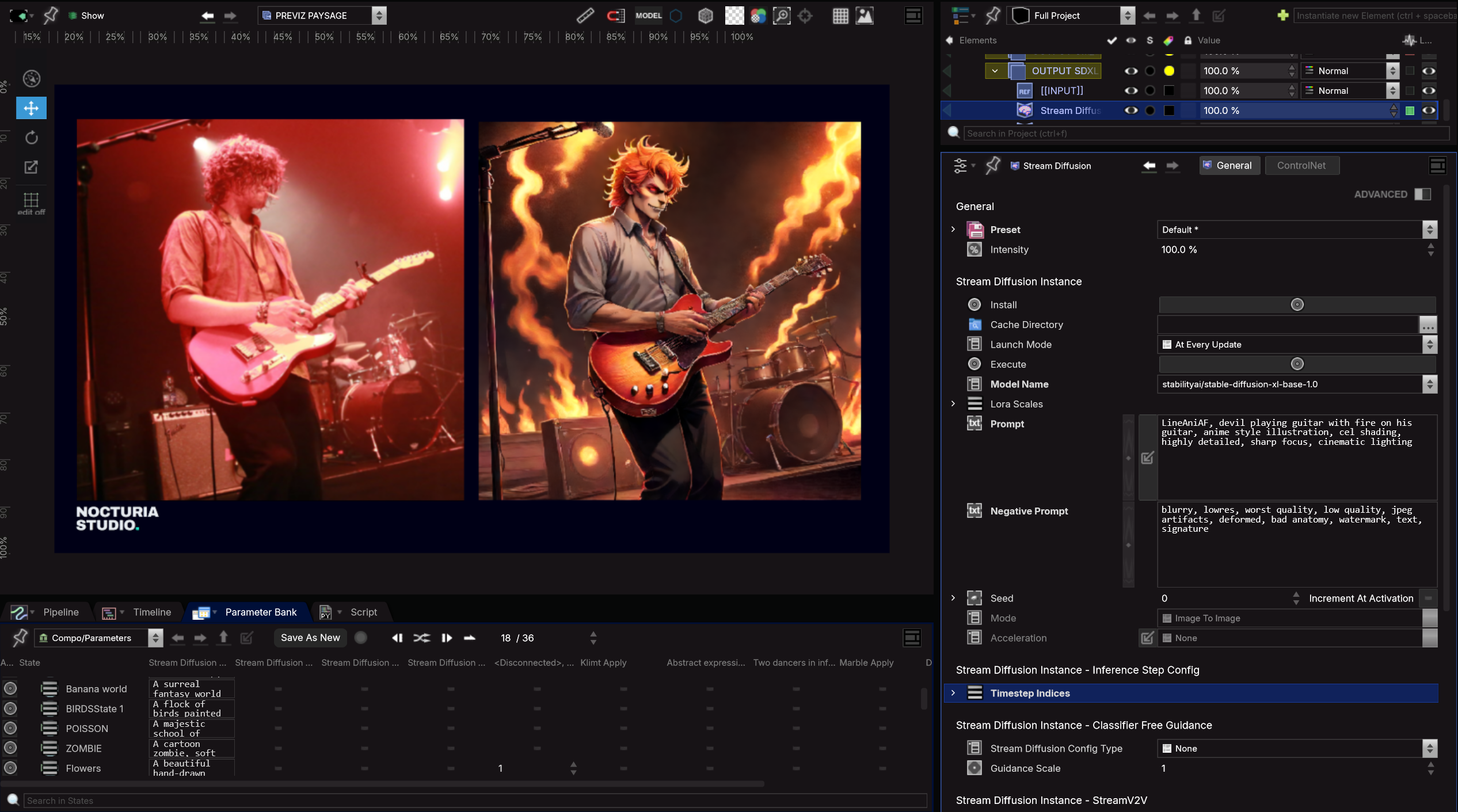
Photo © Nocturia Studio
First steps with StreamDiffusion and SMODE with Romain Delaplace
Romain Delaplace has been passionate about performing arts and digital technologies since 2009. His career took him from lighting to video, before leading him to a role as multimedia programmer and content creator with SMODE. At Nocturia Studio, this dual expertise allows him to contribute at every stage of the production chain, from artistic conception to technical delivery. A SMODE user since 2016, he deploys this software environment across contexts with vastly different constraints, including television productions such as The Voice and Star Academy, as well as the technical demands of major tours, Fuego Tour by Gims, Pascal Obispo concerts, and the MYD Live Experience. His work also extends to the field of immersive experiences, like Beyond Van Gogh, Monet, Les Misérables, La Haine where he transforms every surface into a canvas for expression. His hybrid background allows him to support contemporary productions, where mastery of tools is no longer enough without a broader vision of the project as a whole.
Photo © Nocturia Studio
First steps with StreamDiffusion and SMODE with Romain Delaplace
Romain Delaplace has been passionate about performing arts and digital technologies since 2009. His career took him from lighting to video, before leading him to a role as multimedia programmer and content creator with SMODE. At Nocturia Studio, this dual expertise allows him to contribute at every stage of the production chain, from artistic conception to technical delivery. A SMODE user since 2016, he deploys this software environment across contexts with vastly different constraints, including television productions such as The Voice and Star Academy, as well as the technical demands of major tours, Fuego Tour by Gims, Pascal Obispo concerts, and the MYD Live Experience. His work also extends to the field of immersive experiences, like Beyond Van Gogh, Monet, Les Misérables, La Haine where he transforms every surface into a canvas for expression. His hybrid background allows him to support contemporary productions, where mastery of tools is no longer enough without a broader vision of the project as a whole.
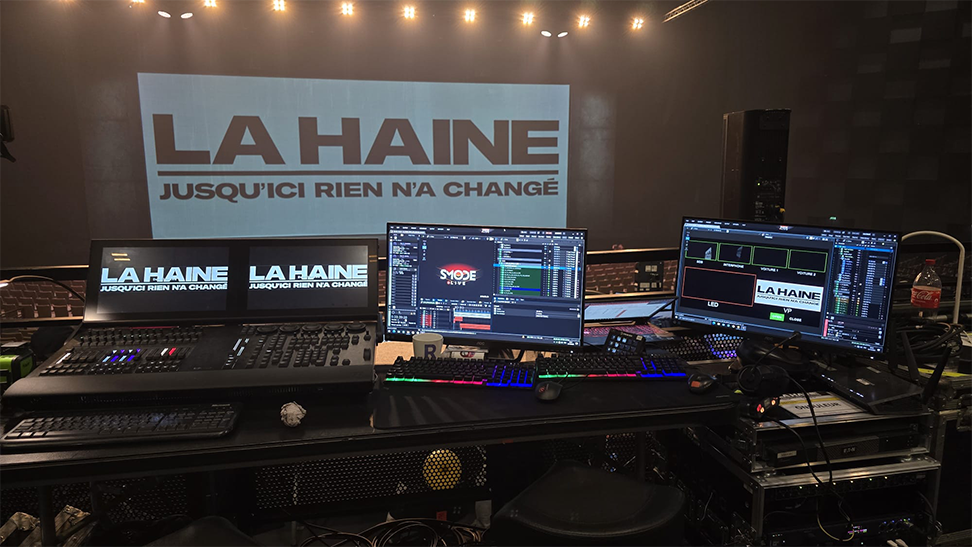
Photo: Anthony Ghnassia, La Haine show
Experimentation
To find the right configuration for a good visual result, the process works through successive attempts, adjusting both the prompt and parameters until the desired result is achieved. Before making these iterative adjustments, a suitable visual style can be established by combining lightweight models with older versions, such as Stable Diffusion 1.5, enhanced with recent LoRA. A LoRA is small module that customizes an AI model without fully retraining it, offering a fast and lightweight way to give it a new style.
A simple text prompt test is set up:
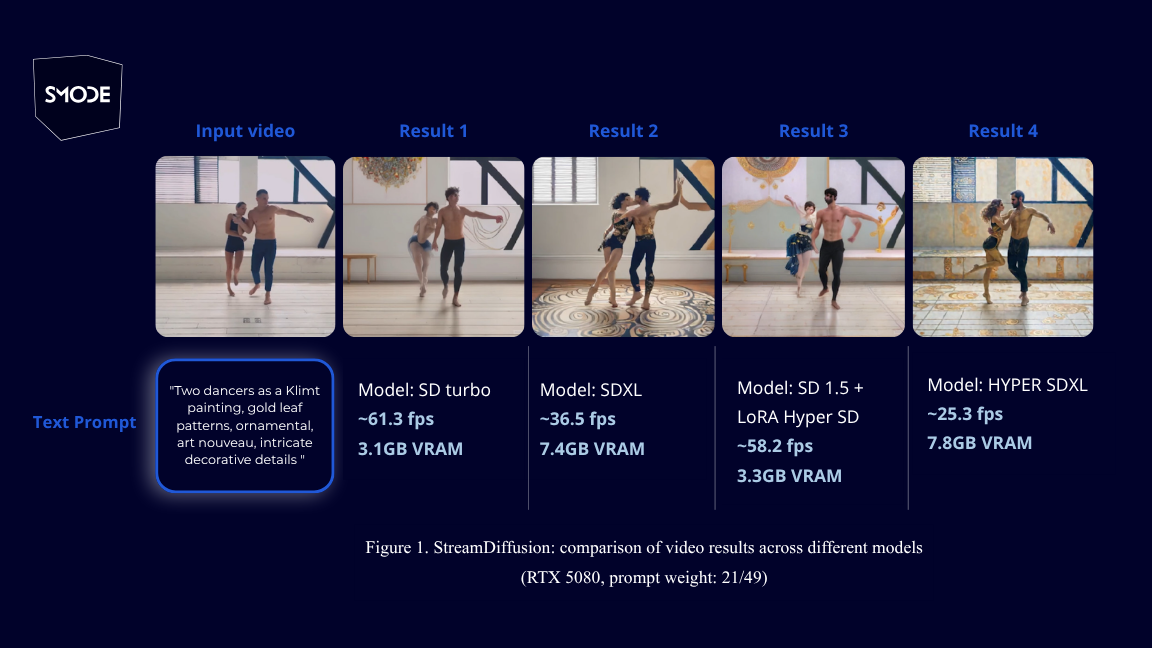
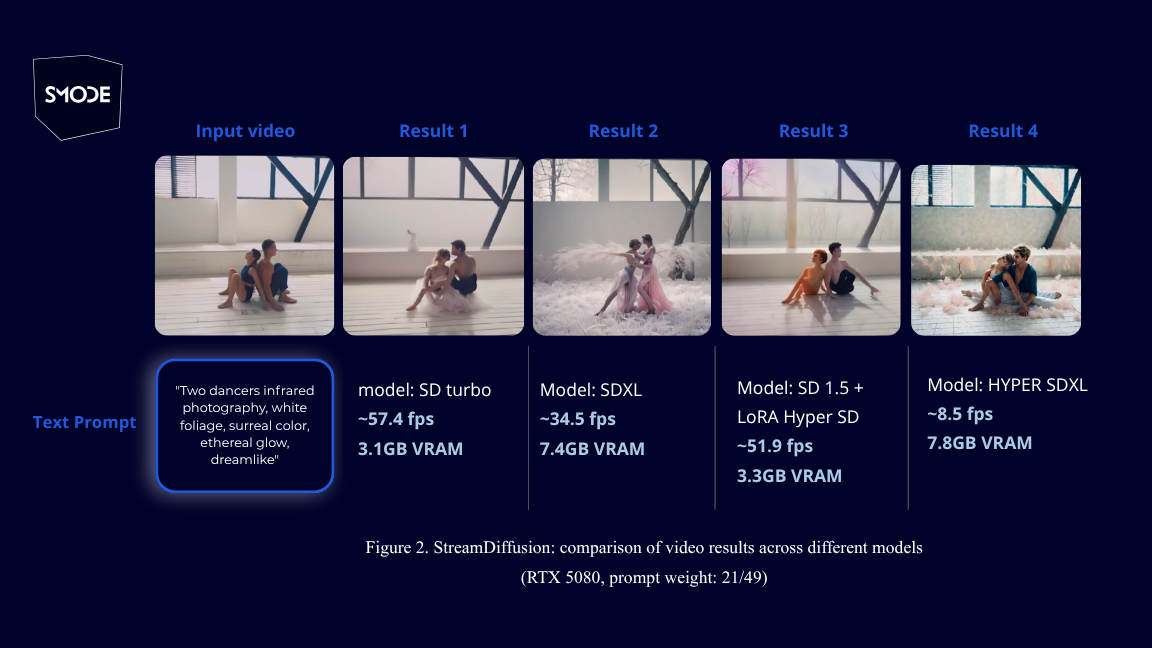
Each test starts from a source video fed into StreamDiffusion. A text prompt describing the desired atmosphere is applied and four different AI models transform this video in real time: SD Turbo, SDXL, SD 1.5 + LoRA Hyper SD, and Hyper SDXL. Settings remain identical throughout all tests, and no AI acceleration engines such as tensorRT or xformers are used. Only the prompt changes from one group to the next. It is also worth noting that generation is performed in a single denoising step. Denoising is the core mechanism of diffusion models: the model starts from random noise and progressively cleans it, step by step, until a coherent image emerges. The more steps used, the more time the model has to refine details, but the slower and more resource-intensive the process becomes.

Hardware used: NVIDIA RTX 5080.
Experimentation: Style and text prompt
- In this first set of results, the prompt pushes toward a style inspired by Gustav Klimt; golden painting and ornamental patterns. The goal is to transform the source video into a painted style while maintaining sufficient fluidity for live use.
Photo: Anthony Ghnassia, La Haine show
Experimentation
To find the right configuration for a good visual result, the process works through successive attempts, adjusting both the prompt and parameters until the desired result is achieved. Before making these iterative adjustments, a suitable visual style can be established by combining lightweight models with older versions, such as Stable Diffusion 1.5, enhanced with recent LoRA. A LoRA is small module that customizes an AI model without fully retraining it, offering a fast and lightweight way to give it a new style.
A simple text prompt test is set up:
Each test starts from a source video fed into StreamDiffusion. A text prompt describing the desired atmosphere is applied and four different AI models transform this video in real time: SD Turbo, SDXL, SD 1.5 + LoRA Hyper SD, and Hyper SDXL. Settings remain identical throughout all tests, and no AI acceleration engines such as tensorRT or xformers are used. Only the prompt changes from one group to the next. It is also worth noting that generation is performed in a single denoising step. Denoising is the core mechanism of diffusion models: the model starts from random noise and progressively cleans it, step by step, until a coherent image emerges. The more steps used, the more time the model has to refine details, but the slower and more resource-intensive the process becomes.
Hardware used: NVIDIA RTX 5080.
Experimentation: Style and text prompt
- In this first set of results, the prompt pushes toward a style inspired by Gustav Klimt; golden painting and ornamental patterns. The goal is to transform the source video into a painted style while maintaining sufficient fluidity for live use.
2. The prompt is designed to accentuate red tones and produce an intense render. The expression "surreal color" steers the palette toward rich, saturated hues, while words like "dreamlike" and "glow" bring a soft, almost ethereal atmosphere to the image.
2. The prompt is designed to accentuate red tones and produce an intense render. The expression "surreal color" steers the palette toward rich, saturated hues, while words like "dreamlike" and "glow" bring a soft, almost ethereal atmosphere to the image.
3. The prompt draws inspiration from the style of Jackson Pollock, characterized by chaotic and colorful paint splatters. The phrases "raw emotion" and "abstract expressionist" reinforce the raw and expressive quality of the render.
3. The prompt draws inspiration from the style of Jackson Pollock, characterized by chaotic and colorful paint splatters. The phrases "raw emotion" and "abstract expressionist" reinforce the raw and expressive quality of the render.
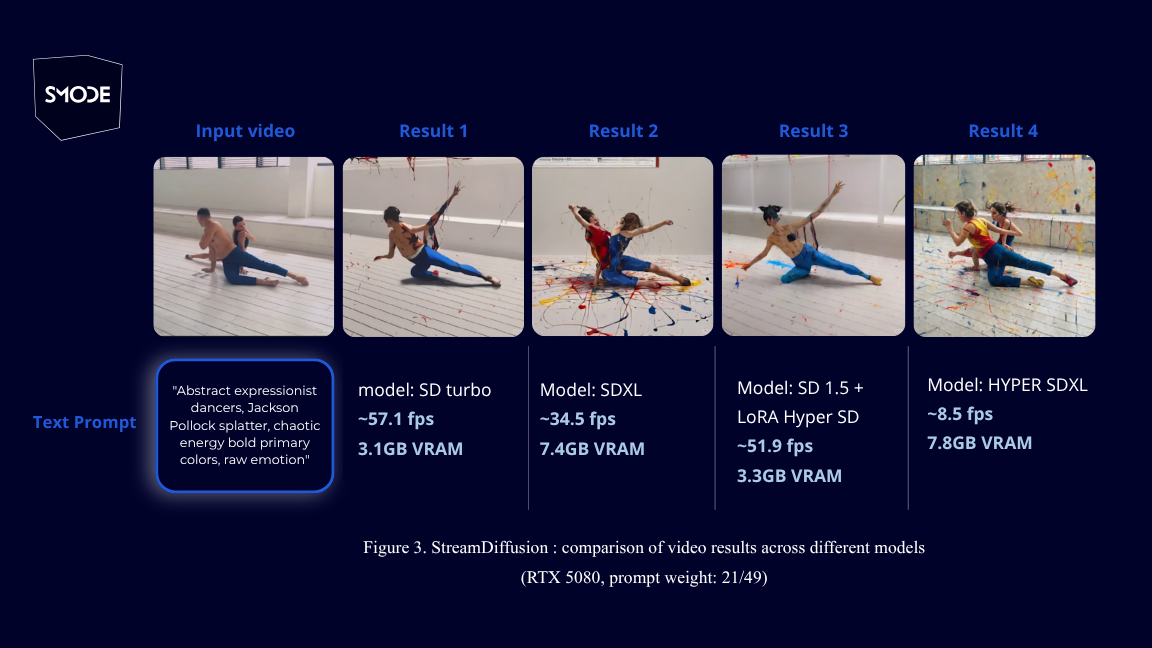
The models SDXL and Hyper SDXL, produce highly detailed and refined images, but are slow and consume a large amount of the graphics card memory, while SD Turbo and SD 1.5 paired with a LoRA, are more lightweight: they run in real time and consume less VRAM, but the generated images are visually less refined.
It's a classic trade-off: quality or fluidity, depending on what you prioritize.
The models SDXL and Hyper SDXL, produce highly detailed and refined images, but are slow and consume a large amount of the graphics card memory, while SD Turbo and SD 1.5 paired with a LoRA, are more lightweight: they run in real time and consume less VRAM, but the generated images are visually less refined.
It's a classic trade-off: quality or fluidity, depending on what you prioritize.
"Applying AI to live performance means taking today's tools into your own hands, reclaiming control by exploring the AI ecosystem through experimentation, trial and error."
"Applying AI to live performance means taking today's tools into your own hands, reclaiming control by exploring the AI ecosystem through experimentation, trial and error."
Experimentation: edge, depth and pose conditioning
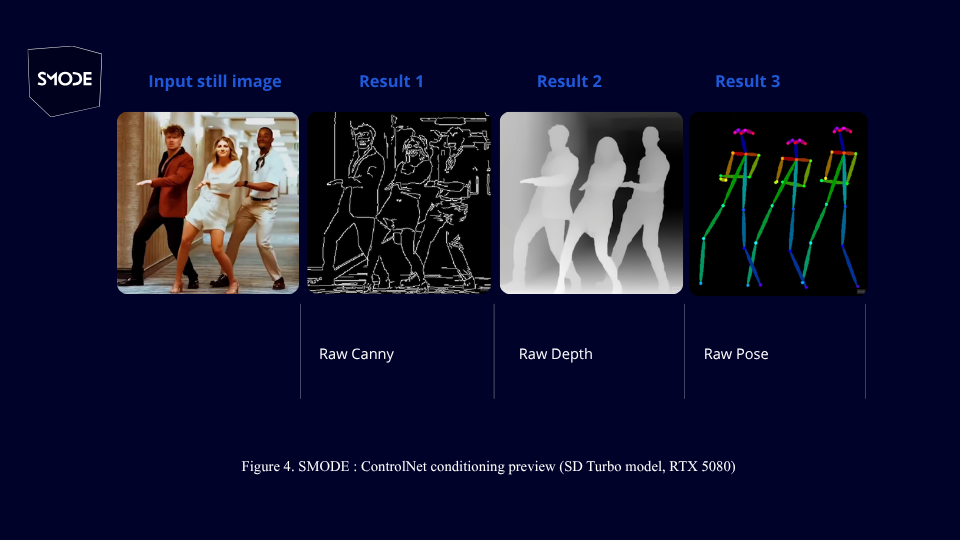
ControlNet is a tool that plugs into an image generation model to provide visual instructions in addition to text. By supplying reference information such as the outline of an object or the silhouette of a person, the model can be guided in a much more precise way. Without ControlNet, you describe what you want in words, and the model interprets freely. With ControlNet, you can show it, for example, the outline of an object or the pose of a character, and it will have to respect that structure in the generated image.
Canny: Detects the edges of an image. Useful for preserving the shape and structure of an object in the generated result.
Depth: Analyses the distances between elements in the scene. Allows the sense of depth and spatial structure of the image to be preserved.
Pose: Detects the position and posture of a human figure. Allows the exact same pose to be reproduced in a generated image (excluding hands).
Experimentation: edge, depth and pose conditioning
ControlNet is a tool that plugs into an image generation model to provide visual instructions in addition to text. By supplying reference information such as the outline of an object or the silhouette of a person, the model can be guided in a much more precise way. Without ControlNet, you describe what you want in words, and the model interprets freely. With ControlNet, you can show it, for example, the outline of an object or the pose of a character, and it will have to respect that structure in the generated image.
Canny: Detects the edges of an image. Useful for preserving the shape and structure of an object in the generated result.
Depth: Analyses the distances between elements in the scene. Allows the sense of depth and spatial structure of the image to be preserved.
Pose: Detects the position and posture of a human figure. Allows the exact same pose to be reproduced in a generated image (excluding hands).
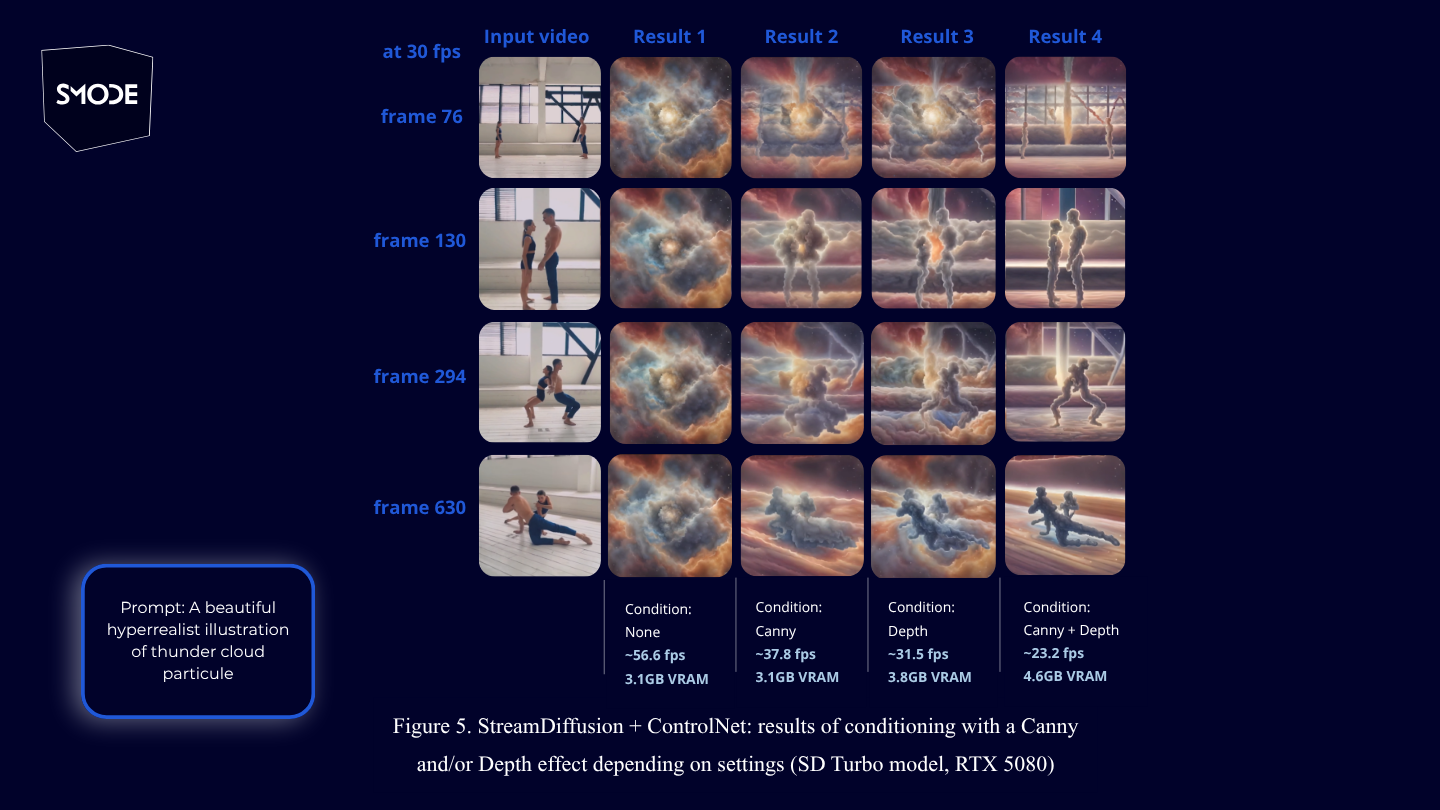
Still using a video stream as input represented in the 1st column, this experiment consists of guiding the source video toward a more harmonious render using a text prompt.
The 2nd column serves as a reference: it shows StreamDiffusion with the SD Turbo model, without any visual instruction. It allows the raw result to be observed, without any visual guide.
The 3rd column uses only the Canny guide. The edges of the video are better defined and noticeably more pronounced in the generated result.
The 4th column applies only the Depth guide, which analyses the depth of elements in the scene. The model understands which elements are in the foreground and which are in the background, and reproduces this organisation in the render.
Finally, the 5th column combines Canny and Depth, achieving a result that draws the best from both guides. Worth noting: stacking multiple ControlNet guides causes a significant drop in fluidity, however graphics card resource consumption is reasonable to get a visually refined render.
Still using a video stream as input represented in the 1st column, this experiment consists of guiding the source video toward a more harmonious render using a text prompt.
The 2nd column serves as a reference: it shows StreamDiffusion with the SD Turbo model, without any visual instruction. It allows the raw result to be observed, without any visual guide.
The 3rd column uses only the Canny guide. The edges of the video are better defined and noticeably more pronounced in the generated result.
The 4th column applies only the Depth guide, which analyses the depth of elements in the scene. The model understands which elements are in the foreground and which are in the background, and reproduces this organisation in the render.
Finally, the 5th column combines Canny and Depth, achieving a result that draws the best from both guides. Worth noting: stacking multiple ControlNet guides causes a significant drop in fluidity, however graphics card resource consumption is reasonable to get a visually refined render.
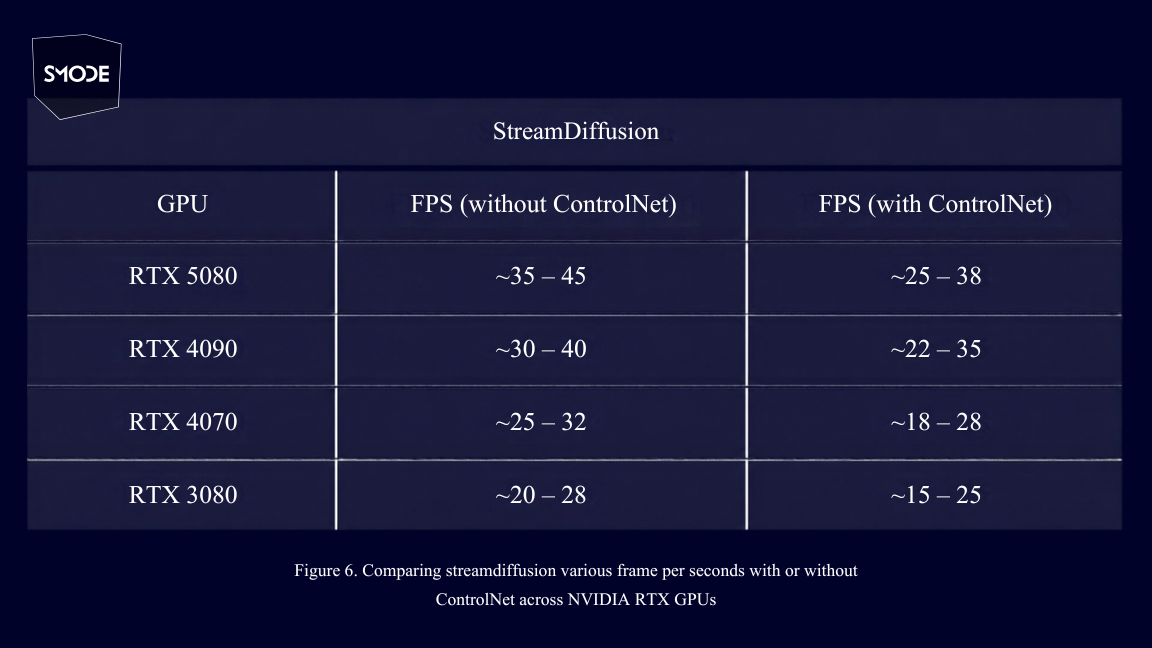
Integrating AI models like StreamDiffusion and ControlNet into SMODE raises a central question: how to run them smoothly and stably in real time? These tools are demanding on GPU resources and behave differently across NVIDIA RTX graphics cards, particularly in terms of frames per second (FPS). This work also addresses their compatibility with LoRA within the software, whose usage varies depending on needs and further increases GPU load. The trade-off between image quality and GPU resource cost must be taken into account. The denoising steps in StreamDiffusion, which progressively correct intentionally introduced imperfections to reveal the image produces a higher quality final render, but increase GPU consumption accordingly.
Integrating AI models like StreamDiffusion and ControlNet into SMODE raises a central question: how to run them smoothly and stably in real time? These tools are demanding on GPU resources and behave differently across NVIDIA RTX graphics cards, particularly in terms of frames per second (FPS). This work also addresses their compatibility with LoRA within the software, whose usage varies depending on needs and further increases GPU load. The trade-off between image quality and GPU resource cost must be taken into account. The denoising steps in StreamDiffusion, which progressively correct intentionally introduced imperfections to reveal the image produces a higher quality final render, but increase GPU consumption accordingly.
SMODE : The walk to a Generative AI Community
StreamDiffusion’s integration into SMODE as a stable built-in tool, enriched by community experimentations from people like Romain, opens new creative possibilities for generative AI in content creation software and can serve as a genuine entry point for growing the community around it. This approach also raises new questions of standardisation and compatibility. One challenge is to simplify the integration of models into software, as they are not all designed in the same way. This requires harmonising dependencies and environments, as well as ensuring compatibility with the hardware infrastructure. In a real-time context, the ideal scenario is seamless integration in environment, near-immediate operation ensuring, and the best achievable image quality within a reasonable GPU budget.
SMODE : The walk to a Generative AI Community
StreamDiffusion’s integration into SMODE as a stable built-in tool, enriched by community experimentations from people like Romain, opens new creative possibilities for generative AI in content creation software and can serve as a genuine entry point for growing the community around it. This approach also raises new questions of standardisation and compatibility. One challenge is to simplify the integration of models into software, as they are not all designed in the same way. This requires harmonising dependencies and environments, as well as ensuring compatibility with the hardware infrastructure. In a real-time context, the ideal scenario is seamless integration in environment, near-immediate operation ensuring, and the best achievable image quality within a reasonable GPU budget.
Credits:
- Written by: Manu Cheremeh
- Research & sources:
- StreamDiffusion: A pipeline-level Solution for Real-time Interactive Generation
- Wikipedia - (ControlNet, LoRA), Adding Conditional Control to Text-to-Image Diffusion Models,
- NVIDIA Documentation tensorrt
- Meta AI / Facebook Research documentation
- Images: Smode Tech, Romain Delaplace - Nocturia Studio, Anthony Ghnassia
- Additional Contributors: Special thanks to Romain Delaplace for his expert insights and resources on the subject, Jules Fouchy, Maxime Cots for their valuable input on the subject, Mélanie Perez and Daniel Lavigne for their valuable feedback on the article’s presentation.
Credits:
- Written by: Manu Cheremeh
- Research & sources:
- StreamDiffusion: A pipeline-level Solution for Real-time Interactive Generation
- Wikipedia - (ControlNet, LoRA), Adding Conditional Control to Text-to-Image Diffusion Models,
- NVIDIA Documentation tensorrt
- Meta AI / Facebook Research documentation
- Images: Smode Tech, Romain Delaplace - Nocturia Studio, Anthony Ghnassia
- Additional Contributors: Special thanks to Romain Delaplace for his expert insights and resources on the subject, Jules Fouchy, Maxime Cots for their valuable input on the subject, Mélanie Perez and Daniel Lavigne for their valuable feedback on the article’s presentation.